If you just want to try to upgrade to IOS 6.0 and now want to downgrade to the iOS 5.1.1. here i will give you a simple way to do that.
1. Connect your iPhone to Mac/PC.
2. Open iTunes (make sure you use latest iTunes 10.6.3. update or download from apple web).
3. Press and hold home button and power button until iPhone off, and release the power button without release the home button.
4. After a while, your iTunes will detect your iPhone on DFU Mode.
5. hold the option (mac)/ Shift (windows) and the click the restore button on iTunes.
6. locate the iOS 5.1.1 *.ipsw on your Disk.
7. Then OK..wait until finish...
thats all.
having any problem, can email to me for help. FOC.
irazzac@gmail.com
Sunday, June 17, 2012

Friday, June 15, 2012
iOS 6.0 Beta 1: how to upgrade without Developer Account Register with Apple
I just updated my iphone 4 and iPhone 4s to iOS 6 beta 1 succesfully.
I just share with you all simple step to do...
1. Download ios 6.0 from imdzl.com.
2. Open iTunes and connect your i device to usb port.
3. Hold option (mac) or shift (windows)
4. click check for update ( dont use restore) and find your .ipsw file and wait until finish.
5. After 20-30 minute, done.
Thats all.
irazzac@gmail.com
I just share with you all simple step to do...
1. Download ios 6.0 from imdzl.com.
2. Open iTunes and connect your i device to usb port.
3. Hold option (mac) or shift (windows)
4. click check for update ( dont use restore) and find your .ipsw file and wait until finish.
5. After 20-30 minute, done.
Thats all.
irazzac@gmail.com
Sunday, May 13, 2012
Apple New iPad aka iPad 3..
Hari ini, kali kedua saya membeli new ipad 4G 64GB warna putih. Saya beli kali pertama pada 04/05/2012 di Apple Store kat kuantan tingkat 2 banggunan ECMALL. Pada mulanya saya memang teringin sangat untuk memiliki New iPad ni sebab dah baca berita banyak sangat berkenaannya di laman maya ini..macam best sangat. Saya sempa pakai seminggu sahaja New iPad yang pertama tu sebab saya ada sedikit tidak puas hati dengan iPad tersebut. Antara masalah yang membuatkan saya rasa nak jual tu seperti:1. Panas : bukan saya yang panas tapi device ipad tu panas. Bila digunakan sambil letak atas katil dalam keadaan pengudaraan tiada di bawah ipad, ia akan jadi panas sangat. Nak sentuh bahagian aluminium kat bawah pun tak boleh. ( masalah ini tiada pada iPad 2).2. Tethering (portable hotspot). : jika ikut pemahaman asal saya sebelum menggunakan, new ipad ini ada portable hotspot. Bila dah pakai, on guna line maxis yang dah tersedia unlimited internet, mula rasa tak puas hati sebab portable hotspot tiada. Bila buat carian balik kat google, baru tahu ang new ipad tethering hanya ada pada 4G LTE network sahaja. Huhuhu...Pastu, mula dah rasa tak puas hati dan jual balik. Tapi alhamdulillah, new ipad masih tinggi valuenya dalam market malaysia. Dapatlah buyer yang sudi beli dengan harga RM2600 ( inc screen protector dan cover lah). So tak rasa rugi sangat.Pastu nak cari balik ipad 2 3g 64gb kat pasaran..punya lah cari merata kedai kat kuantan, semua dah tak ada. Pastu jumpa lah sebiji ada budak nak jual kat mudah.my. Buat janji temu untuk COD, dan dah jumpa tu, buat checking skit..device tu failed sangat condition dia. Hati dah rasa macam rindu dah tak tertahan nak guna ipad ni..maklumlah dah banyak software unutk ipad saya beli. Saya tak suka jailbreak device. Suka beli yang ori sebab respek pembuat software tersebut lah kan..tapi ipad 2 ni ada masalah lain pula bila di kaji balik. Antaranya seperti:1. Display : kebanyakkan ipad 2 ada masalah bleeding dan dead pixel. Pengalaman saya beli dan guna hampir 5 biji ipad (beli pakai dan trade in).. Semua ada masalah bleeding cahaya. Tapi tak ada masalah jika tak diperhalusi. Bagi saya yang agak peka pada barang yang saya beli, saya akan semak detail skit. Bila ada masalah, mula tak senang duduk nak tukar yang baru. ( pada itech jer lah, bini tak macam tu lah).2. Camera : ipad 2 camera dia sangat basic. 0.7 mp sahaja. Gambar kalau nak upload dalam fb tu mmg tak lepas lah. Pecah2... Nak capture sekadar sajer2 kat cahaya terabg tu oklah, tapi tak puas hati lah.3. Retina display: ipad 2 tak ada retina display lah.. Dia punya pixel macam iphone 3gs jer. Tak macam iphone 4/4s..Pastu, dah tak jumpa ipad 2 64gb yang baru, so terbeli lah galaxy tab 7.0 plus.. Pakai sehari jual balik sebab masalah panas juga bila pakai dan software dia ntah apa2 ntah android ni..main kejap, crash n force close. Masalah ini tak pernah jumpa dalam iPad atau iphone.Pastu beli baliklah new iPad 4g 64gb white...balik rumah update ios ke 5.1.1, dan alhamdulillah, setakat ini, masalah panas tu dah berkurangan..so aku menulis lah kat blog ini menggunakan new ipad ni..memang puas hati lah.
Tuesday, March 27, 2012
Apple iPhone 4S atau Samsung Galaxy Note / S2 / S3..Mana satu yang lebih baik?
Assalamualaikum dan Salam Sejahtera kepada semua sahabat pembaca. Saya sering di ajukan soalan berkaitan topik ini dari sahabat-sahabat memandangkan saya memang jenis suka tukar-tukar telefon dan agak jenis suka mencuba sesuatu yang baru berkaitan teknologi dan alat komunikasi semasa. Saya telah pernah menggunakan banyak Telefon jenis smart phone ini yang kini hangat di pasaran...antaranya adalah seperti:-
1. iPhone dari 1st Gen Hingga latest 4S.
2. Samsung Galaxy Note
3. Samsung Tab 7.0 Basic dan 7.0 Plus
4. Samsung Tab 10.1
5. Apple iPad 1st Gen Hingga 2 dan plan for new iPad 2012.
6. HTC Desire HD, HTC Touch
7. Dopod 838 Pro, Dopod 818,
8. HTC Advantage X7500.
9. Nokia E9, Nokia N9, Nokia E7 etc..
..dan banyak lagi yang pernah saya gunakan dan ada yang paling cepat saya resell balik adalah Galaxy Note...
Ok, Disini saya ingin kongsikan sedikit pengalaman dan pandangan peribadi saya selepas mencuba menggunkan telefon pintar yang disebutkan dan secara jujurnya saya katakan iPhone the best setakat saya guna..kenapa?? ok, saya akan cuba terangkan serba sedikit berdasarkan pengalaman saya..
1. Dari Segi OS ( Operating System).
iPhone menggunakan IOS (Based Mac OS) dan sangat stabil berbanding Samsung Galaxy Note/S2 etc yang menggunakan OS Android sama ada Gingerbread, Honeycomb, dan terkini ICS yang base OS adalah Linux. OS yang digunakan ibarat jantung kepada sebuah telefon pintar kerana ia akan mempengaruhi penggunaan kita sehari-hari. Dan saya rasa, sudah tentu pembaca dapat bayangkan secara kasar antara 2 OS utama yang di gunakan ini.
2. Market / App Store / Tempat pembelian Software.
Menurut kajian, sebahagian besar pengguna telefon pintar amat suka download dan install software yang terdapat atau di tawarkan dalam market (Android) atau Appstore (Apple). Dan secara mudahnya dalam Apple Apstore terdapat banyak software yang berkualiti yang di design dan di tapis agar semua yang ada dalam store semua yang boleh (compatible) dengan device yang digunakan. berbanding Android market yang terdapat banyak Aplikasi yang dikategorikan sampah dan terdedah kepada bahaya pada telefon pintar anda.
3. Masalah force Close (android apps) dan incompatible issue apps.
secara mudah untuk di fahami, cuba semak di internet berapa banyak pengeluar yang menggunakan Android OS sebagai OS berbanding Apple IOS yang di buat khas untuk Apple device sahaja dan fix dia punya hardware (cth A4, A5 Chip etc). so masalah akan banyak timbul pada Apps yang dibangunkan dalam Android OS. dengan saiz screen yang pelbagai yang menyukarkan untuk developer untuk membangunkan software yang bersesuaian dengan semua Android device yang ada dalam pasaran (samsung, HTC, Huawei etc..)
iPhone mempunyai device yang stabil dari segi hardware dan software yang membolehkan developer membangunkan software yang sepadan dan senang dibangunkan..
oklah, setakat ini dulu untuk hari ini kerana saya kesuntukkan masa...nanti saya akan update lagi lain kali sambungan seterusnya no. 4,5,6.....
Selamat malam....
Sunday, February 5, 2012
Cara Men-jailbreak iPhone 4S / iPad 2 Anda Menggunakan Absinthe (Windows) [5.0, 5.0.1]
Di bawah ini adalah cara bagaimana melakukan proses "jailbreak untethered" untuk iPhone 4S / iPad 2 IOS 5.0.1 /5.0 Anda menggunakan Absinthe versi Windows.
Peringatan***: Sebelum Anda melakukan sebarang perkara, pastikan Anda telah backup iPhone/iPad Anda pada iTunes kerana ada kemungkinan Anda akan kehilangan Camera Roll / data selepas proses ini.
Peringatan***: Sebelum Anda melakukan sebarang perkara, pastikan Anda telah backup iPhone/iPad Anda pada iTunes kerana ada kemungkinan Anda akan kehilangan Camera Roll / data selepas proses ini.
Langkah Pertama
Download Absinthe terbaru dari sini.
Langkah Kedua
Double klik untuk mengekstrak file yang telah di download tadi dan run aplikasi Absinthe.

Langkah Ketiga
Seterusnya sambungkan iPhone 4S Anda ke komputer via USB. Pastikan delete passcode atau VPN yang telah Anda atur sebelumnya.

Langkah Keempat
Klik Buttonl Jailbreak untuk mula..

Langkah Kelima
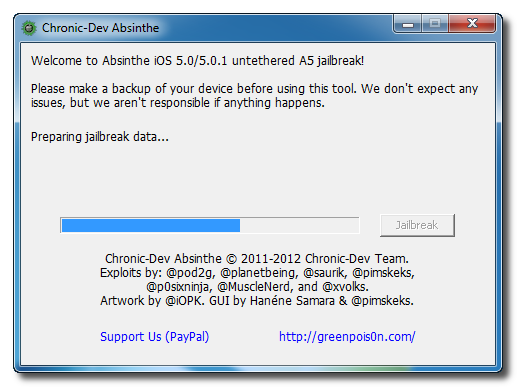
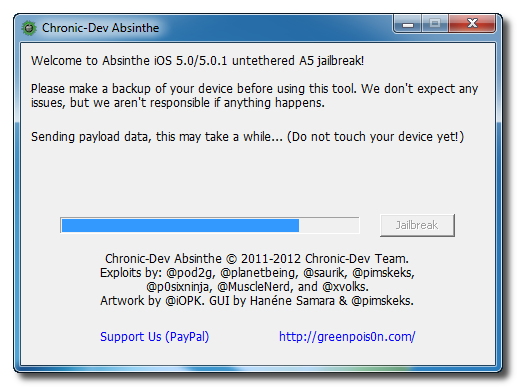
Aplikasi ini akan membawa Anda melalui beberapa langkah jailbreak: Sending initial data, waiting for reboot, waiting for device to finish booting, Preparing jailbreak data, dan Sending payload data.


Langkah Keenam
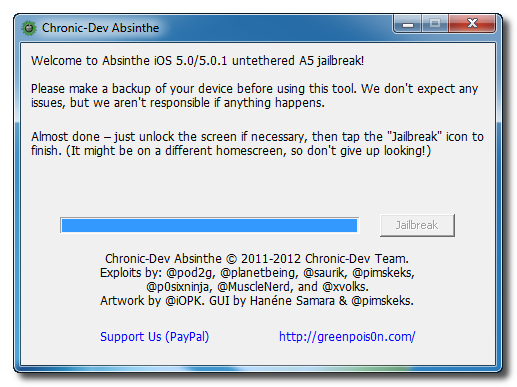
Anda akan diberitahu bahwa jailbreak 'Almost done'.

Langkah Ketujuh
Download Absinthe terbaru dari sini.
Langkah Kedua
Double klik untuk mengekstrak file yang telah di download tadi dan run aplikasi Absinthe.
Langkah Ketiga
Seterusnya sambungkan iPhone 4S Anda ke komputer via USB. Pastikan delete passcode atau VPN yang telah Anda atur sebelumnya.
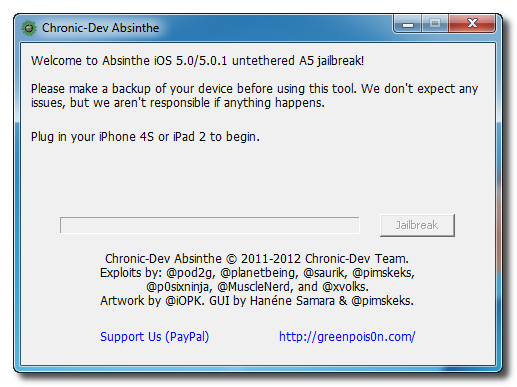
Langkah Keempat
Klik Buttonl Jailbreak untuk mula..
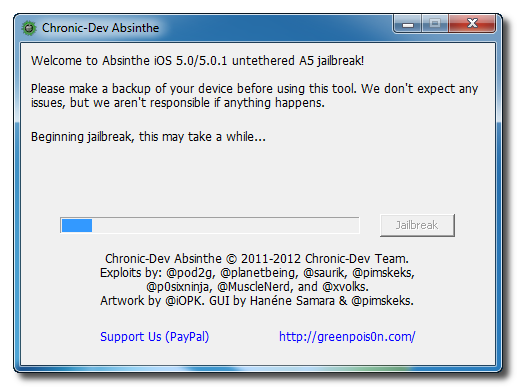
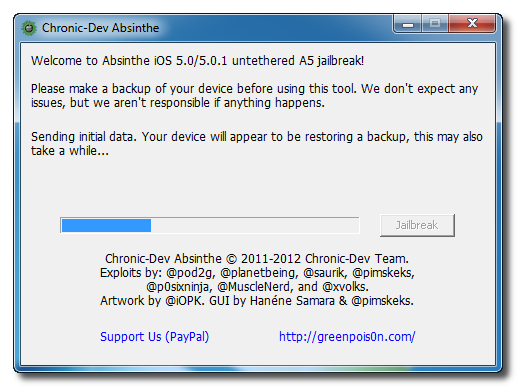
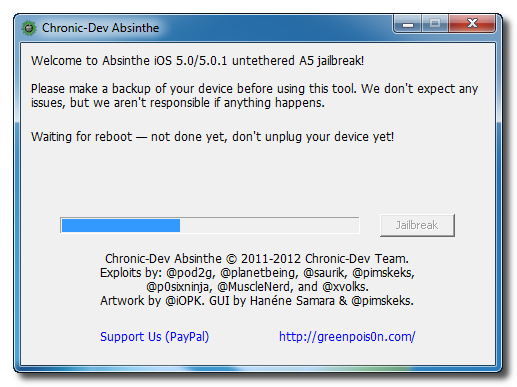
Langkah Kelima
Aplikasi ini akan membawa Anda melalui beberapa langkah jailbreak: Sending initial data, waiting for reboot, waiting for device to finish booting, Preparing jailbreak data, dan Sending payload data.
Langkah Keenam
Anda akan diberitahu bahwa jailbreak 'Almost done'.
Langkah Ketujuh
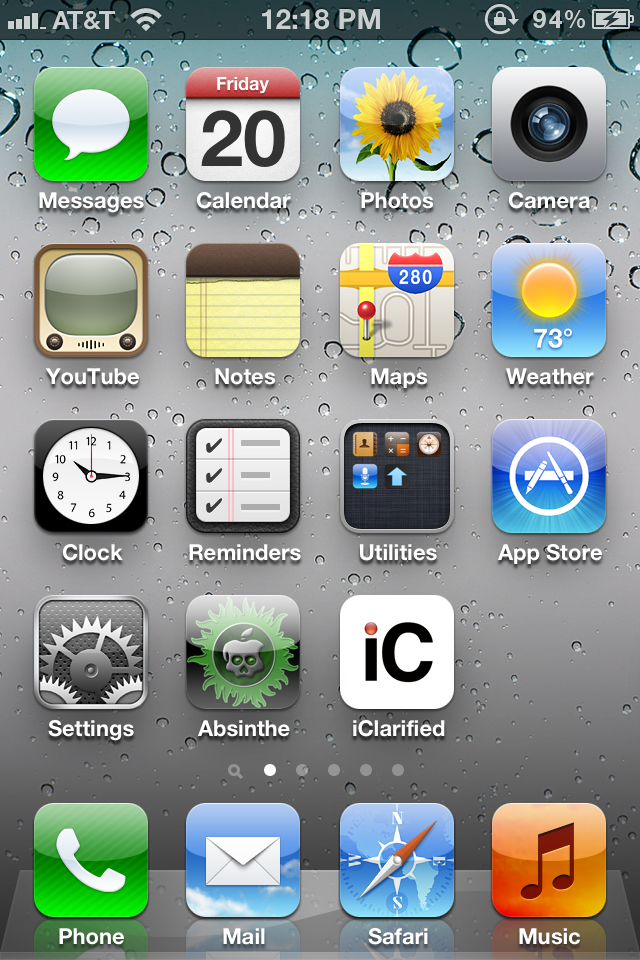
Seterusnya, cari ikon Absinthe dan touch/open untuk proses install cydia melalui Absinthe. Icon tersebut terdapat di homescreen.

Jika server sedang down dan Anda mendapatkan mesej Error establishing a database connection klik ikon Settings di springroad dan hidupkan VPN.


Anda akan mendapatkan mesej kesalahan konfigurasi; namun, setelah sekitar seminit iphone Anda akan boot ulang dengan Cydia di Springboard!

Jika server sedang down dan Anda mendapatkan mesej Error establishing a database connection klik ikon Settings di springroad dan hidupkan VPN.
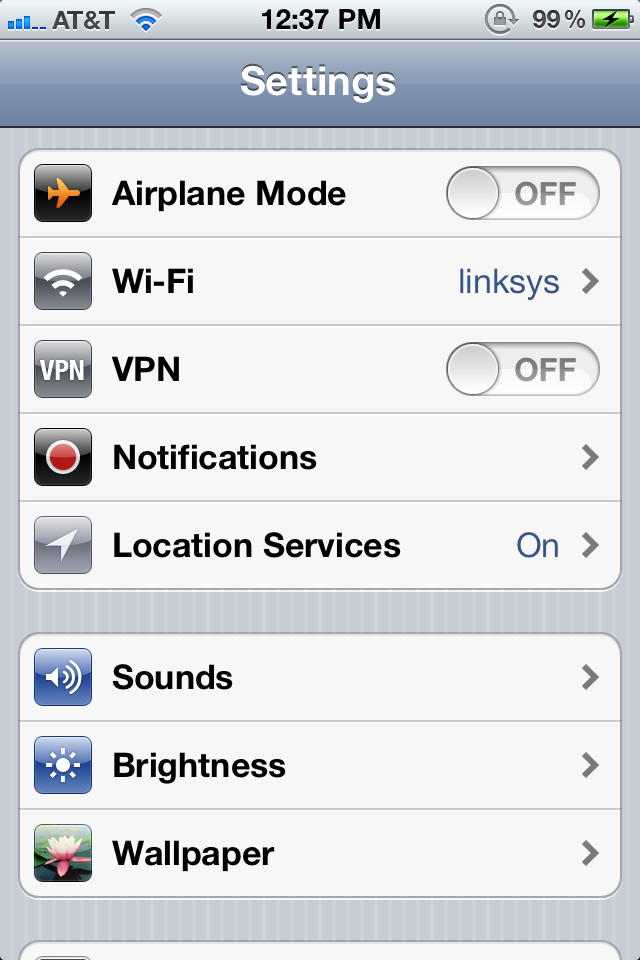
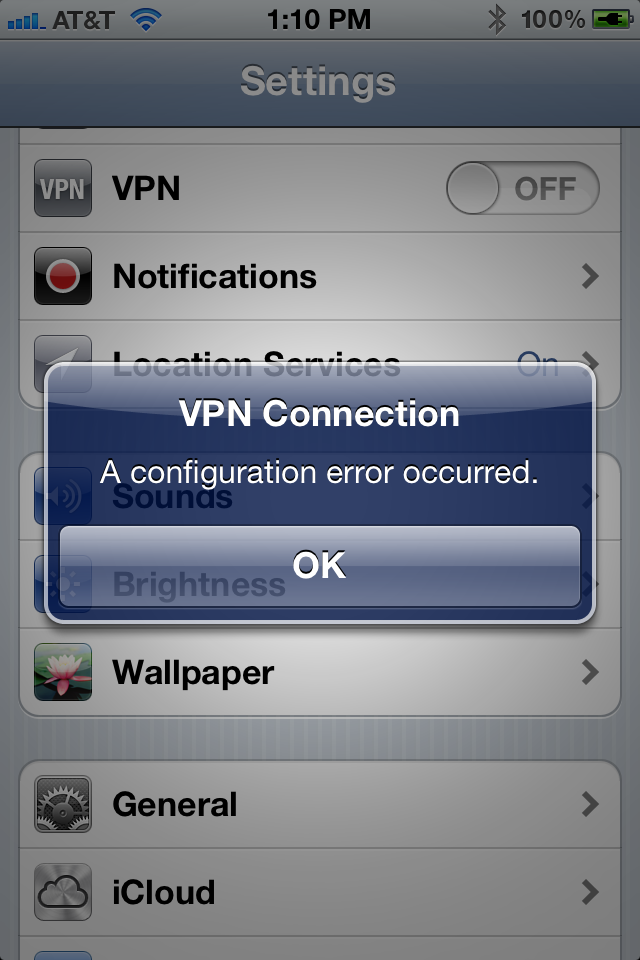
Anda akan mendapatkan mesej kesalahan konfigurasi; namun, setelah sekitar seminit iphone Anda akan boot ulang dengan Cydia di Springboard!
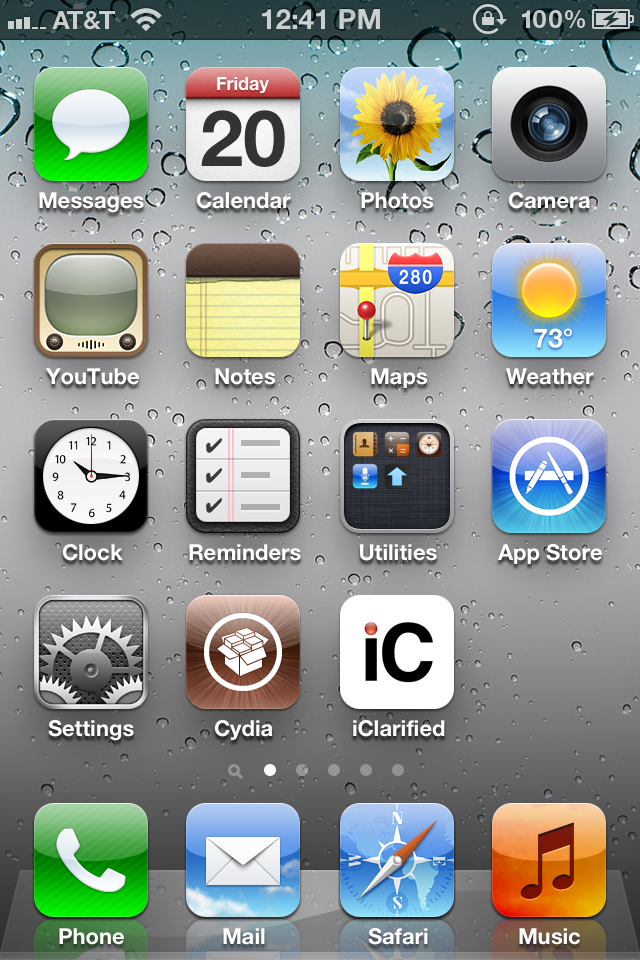
Sekian, Sudah selesai...sebarang pertanyaan boleh emelkan kepada saya.
Reasons to Jailbreak the iPhone 4S/4/3GS/iPad/iPod..
Cydia Apps

Cydia is an alternate app store that makes it easy to find and install apps that Apple wouldn’t approve. Many of the reasons to jailbreak will require a trip to this new app store, only available on jailbroken iPhones. This is the place to go for all the cool apps and features you want on your iPhone, but that Apple won’t deliver until iOS 6.
BrowserChanger

If you want to use an alternate iPhone browsers like Opera or Dolphin, you don’t need to jailbreak, but then all of your apps will use the open in safari behavior and skip right past your favorite browser. Not anymore. Install BrowserChanger and you can choose which browser you want to open when you grab a link from Facebook or Twitter.
Real Google Voice

Google Voice Extension - iPhone 4S Jailbreak
3G Facetime

SB Settings
SB Settings gives you fast access to your WiFi, Bluetooth and brightness settings. Of all the things Apple makes simple, it sucks at giving you fast access to these essential controls. SB Settings puts them right in your notification pull down so that you can quickly change brightness, turn on Bluetooth and more.Customized Looks
If you wan to change the whole look of your iPhone, to something like OS X Lion or your favorite color combination, you can do this when you Jailbreak your iPhone 4S. There are a number fo WinterBoard themes available to change how your iPhone looks. From minor tweaks to massive changes, you get to customize your iPhone 4S.MyWi – 3G Hotspot

If you want to use your iPhone 4S as a hotspot without signing up for a plan from your carrier, you can use MyWi. This could end up getting you in trouble with certain carriers, and if you use a lot of data you may be better off paying for a hotspot from your carrier. A cool tool, but definitely one to use at your own risk.
Mario on Your iPhone
Another awesome addition when you jailbreak is the ability to load up your favorite emulators like nes4iPhone, snes4iPhone and others. These tools will let you play Roms from your favorite old-time game systems. ROMS are a grey area, so if you don’t own the actual game, you are probably breaking the law. Another fun hack, but one to do at your own risk. You can see the this in action, using the Wiimote as a controller.Five Icon Dock

If you want to add another favorite program to your dock, Five Icon Dock will do that for you by packing in icons tighter. A small tweak, but we all have one more program we want on the home screen at all times. right?
Five Icon Switcher

If you’re going to put 5 icons in your home dock, you’ll want the same five icon look in the multitasking switcher, which is exactly what this app does for you.
Overboard
Even after you add an extra icon to your dock, you’ll want to have Overboard installed. You can pull up a a listing of all of your iPhone screens for easy jumping and navigation. This one is $2 in the Cydia app store and essential if you have page after page of apps. You can see how Overboard works in the video shown above.BiteSMS
Forget about going into the Message app to reply to texts and iMessages, Bite SMS allows you to reply directly from the notification. This is fully compatible with iOS 5 and works with iMessaging. Check out the BiteSMS features in the demo above.IntelliscreenX
If you want to do even more in the Notification Center, IntelliscreenX looks like the best solution. You can access more than just notifications with this jailbreak only app. Check out the video above for all the details.Add More Gestures
Activator will add more gestures to your iPhone 4S. You can swipe left ont he status bar to launch a specific app or double tap to start a new text message in Bite SMS. You’ll be amazed by how much time you save using this app. Ignore the horrible music, and look at Activator in action in the video shown above.Arrange Icons As You Want
Instead of filling up from the upper left to the lower right, Gridlock allows you to place your iPhone apps wherever you want them, leaving open places if you want to keep space around your favorite app for easy tapping. Check out Gridlock in action in the video above.Never Enter Your App Store Password Again
With PasswordPilot, you don’t need to enter your password every time you download an app or download updates. This isn’t good if you are sharing your iPhone, but if you keep a passcode on your iPhone and are sick of typing in your password with every purchase and download it is awesome.Add Pictures To Your Contacts
With Copic, you can add pictures to your iPhone contacts, phone call log and SMS message screens. A nice touch for browsing through your messages quickly. You can see a demo of Copic in the video above.No More Lockscreen
If you want to skip the slide to unlock feature, you can turn on this app and it will automatically unlock your phone to the home screen when you press the power button. Unfortunately, you still see the unlock screen for a second, but it beats sliding to unlock for some users.–
When you can Jailbreak the iPhone 4S, you will be able to search for these apps and hacks in Cydia. If you have a jailbroken iPhone 4, you can get to using them right now.
Sunday, July 31, 2011
WiFi 802.22 Technology Promises Wireless Data Over 60 Miles: Say Goodbye to Data Plans
It’s the news bit you’ve been waiting years to hear! The folks at the IEEE standards body have today announced a next-generation WiFi IEEE 802.22TM standard – technology that’s designed to facilitate wireless data transfer up to 60 miles (or a hundred kilometers) at 22Mbps. This technology is said to work over these great distances by utilizing television bands – without interfering with the reception of existing television broadcast stations at that. Imagine it – connect to your HambergerDLX network anywhere inside your town from your smartphone with no data plan costs. Magical freedom!
This technology takes advantage of VHF and UHF TV bands and transmits broadband wireless internet over 60 miles in diameter. This technology takes place in the space between channels, aka the place where the poltergeists live, if you believe technology lore. The officials at the IEEE standards body have noted the following about this new age in wireless technology:
This new standard for Wireless Regional Area Networks (WRANs) takes advantage of the favorable transmission characteristics of the VHF and UHF TV bands to provide broadband wireless access over a large area up to 100 km from the transmitter. Each WRAN will deliver up to 22 Mbps per channel without interfering with reception of existing TV broadcast stations, using the so-called white spaces between the occupied TV channels.
IEEE, the world’s largest professional association advancing technology for humanity that is, noted that this technology will be “especially useful” in less densely populated areas, developing countries, and other locations where most vacant television channels can be found. They’re there – let’s use em!
What if it’s true? It seems much, much too good to be true, doesn’t it? It’s the inexpensive means of getting data we’ve always dreamed of. Just think of only spending $60 a month (or however much it costs near you) for data both in and outside your home, unlimited data, data you’d otherwise have to pay twice as much for on a network that might just as well be cut out of the equation altogether? The facts are here, the news release is plain and simple, but something tells me this tech might never see the light of day – what do you think?
This technology takes advantage of VHF and UHF TV bands and transmits broadband wireless internet over 60 miles in diameter. This technology takes place in the space between channels, aka the place where the poltergeists live, if you believe technology lore. The officials at the IEEE standards body have noted the following about this new age in wireless technology:
This new standard for Wireless Regional Area Networks (WRANs) takes advantage of the favorable transmission characteristics of the VHF and UHF TV bands to provide broadband wireless access over a large area up to 100 km from the transmitter. Each WRAN will deliver up to 22 Mbps per channel without interfering with reception of existing TV broadcast stations, using the so-called white spaces between the occupied TV channels.
IEEE, the world’s largest professional association advancing technology for humanity that is, noted that this technology will be “especially useful” in less densely populated areas, developing countries, and other locations where most vacant television channels can be found. They’re there – let’s use em!
What if it’s true? It seems much, much too good to be true, doesn’t it? It’s the inexpensive means of getting data we’ve always dreamed of. Just think of only spending $60 a month (or however much it costs near you) for data both in and outside your home, unlimited data, data you’d otherwise have to pay twice as much for on a network that might just as well be cut out of the equation altogether? The facts are here, the news release is plain and simple, but something tells me this tech might never see the light of day – what do you think?
Subscribe to:
Posts (Atom)